Saturday, April 24, 2010
WHAT IS HARDWARE?
Information processing involves four phases: input, process, output, and storage. Each of these phases and the associated devices are discussed below.
Input devices: Input devices include the keyboard, pointing devices, scanners and reading devices, digital cameras, audio and video input devices, and input devices for physically challenged users. Input devices are used to capture data at the earliest possible point in the workflow, so that the data are accurate and readily available for processing.
Processing: After data are captured, they are processed. When data are processed, they are transformed from raw facts into meaningful information. A variety of processes may be performed on the data, such as adding, subtracting, dividing, multiplying, sorting, organizing, formatting, comparing, and graphing. After processing, information is output, as a printed report, for example, or stored as files.
Output devices: Four common types of output are text, graphics, audio, and video. Once information has been processed, it can be listened to through speakers or a headset, printed onto paper, or displayed on a monitor. An output device is any computer component capable of conveying information to a user. Commonly used output devices include display devices, printers, speakers, headsets, data projectors, fax machines, and multifunction devices. A multifunction device is a single piece of equipment that looks like a copy machine but provides the functionality of a printer, scanner, copy machine, and perhaps a fax machine.
Storage devices: Storage devices retain items such as data, instructions, and information for retrieval and future use. They include floppy disks or diskettes, hard disks, compact discs (both read-only and disc-recordable), tapes, PC cards, Smart Cards, microfilm, and microfiche.


INFORMATION and DATA PROCESSING INFORMATION TECHNOLOGY
Data processing is the input, verification, organization, storage, retrieval, transformation, and extraction of information from data. The term is usually associated with commercial applications such as inventory control or payroll. An information system refers to business applications of computers and consists of the databases, application programs, and manual and machine procedures and computer systems that process data. Databases store the master files of the business and its transaction files. Application programs provide the data entry, updating, and query and report processing. Manual procedures document the workflow, showing how the data are obtained for input and how the system's output is distributed. Machine procedures instruct the computers how to perform batch-processing activities, in which the output of one program is automatically fed into another program. Daily processing is the interactive, real-time processing of transactions. Batch-processing programs are run at the end of the day (or some other period) to update the master files that have not been updated since the last cycle. Reports are printed for the cycle's activities. Periodic processing of an information system involves updating of the master files— adding, deleting, and changing the information about customers, employees, vendors, and products.
WHAT IS SOFTWARE?
Computer software consists of the programs, or lists of instructions, that control the operation of a computer. Application software can be used for the following purposes:
Productivity Software Productivity software is designed to make people more effective and efficient when performing daily activities. It includes applications such as word processing, spreadsheets, databases, presentation graphics, personal information management, graphics and multimedia, communications, and other related types of software. Word-processing software is used to create documents such as letters, memos, reports, mailing labels, and newsletters. This software is used to create attractive and professional-looking documents that are stored electronically, allowing them to be retrieved and revised. The software provides tools to correct spelling and grammatical mistakes, permits copying and moving text without rekeying, and provides tools to enhance the format of documents. Electronic spreadsheet software is used in business environments to perform numeric calculations rapidly and accurately. Data are keyed into rows and columns on a worksheet, and formulas and functions are used to make fast and accurate calculations. Spreadsheets are used for "what-if" analyses and for creating charts based on information in a worksheet. A database is a collection of data organized in a manner that allows access, retrieval, and use of that data. A database management system (DBMS) is used to create a computerized database; add, change, and delete data; sort and retrieve data from the database; and create forms and reports using the data in the database. Presentation graphics software is used to create presentations, which can include clip-art images, pictures, video clips, and audio clips as well as text. A personal information manager is a software application that includes an appointment calendar, address book, and notepad to help organize personal information such as appointments and task lists. Engineers, architects, desktop publishers, and graphic artists often use graphics and multimedia software such as computer-aided design, desktop publishing, video and audio entertainment, and Web page authoring. Software for communications includes groupware, e-mail, and Web browsers.
- As a productivity/business tool
- To assist with graphics and multimedia projects
- To support household activities, for personal business, or for education
- To facilitate communications
Productivity Software Productivity software is designed to make people more effective and efficient when performing daily activities. It includes applications such as word processing, spreadsheets, databases, presentation graphics, personal information management, graphics and multimedia, communications, and other related types of software. Word-processing software is used to create documents such as letters, memos, reports, mailing labels, and newsletters. This software is used to create attractive and professional-looking documents that are stored electronically, allowing them to be retrieved and revised. The software provides tools to correct spelling and grammatical mistakes, permits copying and moving text without rekeying, and provides tools to enhance the format of documents. Electronic spreadsheet software is used in business environments to perform numeric calculations rapidly and accurately. Data are keyed into rows and columns on a worksheet, and formulas and functions are used to make fast and accurate calculations. Spreadsheets are used for "what-if" analyses and for creating charts based on information in a worksheet. A database is a collection of data organized in a manner that allows access, retrieval, and use of that data. A database management system (DBMS) is used to create a computerized database; add, change, and delete data; sort and retrieve data from the database; and create forms and reports using the data in the database. Presentation graphics software is used to create presentations, which can include clip-art images, pictures, video clips, and audio clips as well as text. A personal information manager is a software application that includes an appointment calendar, address book, and notepad to help organize personal information such as appointments and task lists. Engineers, architects, desktop publishers, and graphic artists often use graphics and multimedia software such as computer-aided design, desktop publishing, video and audio entertainment, and Web page authoring. Software for communications includes groupware, e-mail, and Web browsers.
INFORMATION TECHNOLOGY_TRENDS
Information Technology Departments will be increasingly concerned with data storage and management, and will find that information security will continue to be at the top of the priority list. Cloud computing remains a growing area to watch. The job outlook for those within Information Technology is strong, with data security and server gurus amongst the highest paid techies. Check out the Information Security Certifications and Highest Paying Certifications for more information. In order to stay current in the Information Technology Industry, be sure you subscribe to top technology industry publications.
INFORMATION TECHNOLOGY's ROLE NOW A DAY's
Every day, people use computers in new ways. Computers are increasingly affordable; they continue to be more powerful as information-processing tools as well as easier to use.
Computers in Business :One of the first and largest applications of computers is keeping and managing business and financial records. Most large companies keep the employment records of all their workers in large databases that are managed by computer programs. Similar programs and databases are used in such business functions as billing customers; tracking payments received and payments to be made; and tracking supplies needed and items produced, stored, shipped, and sold. In fact, practically all the information companies need to do business involves the use of computers and information technology.
On a smaller scale, many businesses have replaced cash registers with point-of-sale (POS) terminals. These POS terminals not only print a sales receipt for the customer but also send information to a computer database when each item is sold to maintain an inventory of items on hand and items to be ordered. Computers have also become very important in modern factories. Computer-controlled robots now do tasks that are hot, heavy, or hazardous. Robots are also used to do routine, repetitive tasks in which boredom or fatigue can lead to poor quality work.
Computers in Medicine: Information technology plays an important role in medicine. For example, a scanner takes a series of pictures of the body by means of computerized axial tomography (CAT) or magnetic resonance imaging (MRI). A computer then combines the pictures to produce detailed three-dimensional images of the body's organs. In addition, the MRI produces images that show changes in body chemistry and blood flow.
Computers in Science and Engineering: Using supercomputers, meteorologists predict future weather by using a combination of observations of weather conditions from many sources, a mathematical representation of the behavior of the atmosphere, and geographic data.
Computer-aided design and computer-aided manufacturing programs, often called CAD/CAM, have led to improved products in many fields, especially where designs tend to be very detailed. Computer programs make it possible for engineers to analyze designs of complex structures such as power plants and space stations.
Integrated Information Systems: With today's sophisticated hardware, software, and communications technologies, it is often difficult to classify a system as belonging uniquely to one specific application program. Organizations increasingly are consolidating their information needs into a single, integrated information system. One example is SAP, a German software package that runs on mainframe computers and provides an enterprise-wide solution for information technologies. It is a powerful database that enables companies to organize all their data into a single database, then choose only the program modules or tables they want. The freestanding modules are customized to fit each customer's needs.
Computers in Business :One of the first and largest applications of computers is keeping and managing business and financial records. Most large companies keep the employment records of all their workers in large databases that are managed by computer programs. Similar programs and databases are used in such business functions as billing customers; tracking payments received and payments to be made; and tracking supplies needed and items produced, stored, shipped, and sold. In fact, practically all the information companies need to do business involves the use of computers and information technology.
On a smaller scale, many businesses have replaced cash registers with point-of-sale (POS) terminals. These POS terminals not only print a sales receipt for the customer but also send information to a computer database when each item is sold to maintain an inventory of items on hand and items to be ordered. Computers have also become very important in modern factories. Computer-controlled robots now do tasks that are hot, heavy, or hazardous. Robots are also used to do routine, repetitive tasks in which boredom or fatigue can lead to poor quality work.
Computers in Medicine: Information technology plays an important role in medicine. For example, a scanner takes a series of pictures of the body by means of computerized axial tomography (CAT) or magnetic resonance imaging (MRI). A computer then combines the pictures to produce detailed three-dimensional images of the body's organs. In addition, the MRI produces images that show changes in body chemistry and blood flow.
Computers in Science and Engineering: Using supercomputers, meteorologists predict future weather by using a combination of observations of weather conditions from many sources, a mathematical representation of the behavior of the atmosphere, and geographic data.
Computer-aided design and computer-aided manufacturing programs, often called CAD/CAM, have led to improved products in many fields, especially where designs tend to be very detailed. Computer programs make it possible for engineers to analyze designs of complex structures such as power plants and space stations.
Integrated Information Systems: With today's sophisticated hardware, software, and communications technologies, it is often difficult to classify a system as belonging uniquely to one specific application program. Organizations increasingly are consolidating their information needs into a single, integrated information system. One example is SAP, a German software package that runs on mainframe computers and provides an enterprise-wide solution for information technologies. It is a powerful database that enables companies to organize all their data into a single database, then choose only the program modules or tables they want. The freestanding modules are customized to fit each customer's needs.
MOST POPULAR INFORMATION TECHNOLOGY SKILLS
Some of the most popular information technology skills at the moment are:
- Computer Networking
- Information Security
- IT Governance
- ITIL
- Business Intelligence
- Linux
- Unix
- Project Management
MODERN INFORMATION TECHNOLOGY
In order to perform the complex functions required of information technology departments today, the modern Information Technology Department would use computers, servers, database management systems, and cryptography. The department would be made up of several System Administrators, Database Administrators and at least one Information Technology Manager. The group usually reports to the Chief Information Officer (CIO).
HISTORY OF INFORMATION TECHNOLOGY
The term "information technology" evolved in the 1970s. Its basic concept, however, can be traced to the World War II alliance of the military and industry in the development of electronics, computers, and information theory. After the 1940s, the military remained the major source of research and development funding for the expansion of automation to replace manpower with machine power.
Since the 1950s, four generations of computers have evolved. Each generation reflected a change to hardware of decreased size but increased capabilities to control computer operations. The first generation used vacuum tubes, the second used transistors, the third used integrated circuits, and the fourth used integrated circuits on a single computer chip. Advances in artificial intelligence that will minimize the need for complex programming characterize the fifth generation of computers, still in the experimental stage.
The first commercial computer was the UNIVAC I, developed by John Eckert and John W. Mauchly in 1951. It was used by the Census Bureau to predict the outcome of the 1952 presidential election. For the next twenty-five years, mainframe computers were used in large corporations to do calculations and manipulate large amounts of information stored in databases. Supercomputers were used in science and engineering, for designing aircraft and nuclear reactors, and for predicting worldwide weather patterns. Minicomputers came on to the scene in the early 1980s in small businesses, manufacturing plants, and factories.
In 1975, the Massachusetts Institute of Technology developed microcomputers. In 1976, Tandy Corporation's first Radio Shack microcomputer followed; the Apple microcomputer was introduced in 1977. The market for microcomputers increased dramatically when IBM introduced the first personal computer in the fall of 1981. Because of dramatic improvements in computer components and manufacturing, personal computers today do more than the largest computers of the mid-1960s at about a thousandth of the cost.
Computers today are divided into four categories by size, cost, and processing ability. They are supercomputer, mainframe, minicomputer, and microcomputer, more commonly known as a personal computer. Personal computer categories include desktop, network, laptop, and handheld.
Since the 1950s, four generations of computers have evolved. Each generation reflected a change to hardware of decreased size but increased capabilities to control computer operations. The first generation used vacuum tubes, the second used transistors, the third used integrated circuits, and the fourth used integrated circuits on a single computer chip. Advances in artificial intelligence that will minimize the need for complex programming characterize the fifth generation of computers, still in the experimental stage.
The first commercial computer was the UNIVAC I, developed by John Eckert and John W. Mauchly in 1951. It was used by the Census Bureau to predict the outcome of the 1952 presidential election. For the next twenty-five years, mainframe computers were used in large corporations to do calculations and manipulate large amounts of information stored in databases. Supercomputers were used in science and engineering, for designing aircraft and nuclear reactors, and for predicting worldwide weather patterns. Minicomputers came on to the scene in the early 1980s in small businesses, manufacturing plants, and factories.
In 1975, the Massachusetts Institute of Technology developed microcomputers. In 1976, Tandy Corporation's first Radio Shack microcomputer followed; the Apple microcomputer was introduced in 1977. The market for microcomputers increased dramatically when IBM introduced the first personal computer in the fall of 1981. Because of dramatic improvements in computer components and manufacturing, personal computers today do more than the largest computers of the mid-1960s at about a thousandth of the cost.
Computers today are divided into four categories by size, cost, and processing ability. They are supercomputer, mainframe, minicomputer, and microcomputer, more commonly known as a personal computer. Personal computer categories include desktop, network, laptop, and handheld.
DEFINATION OF INFORMATION TECHNOLOGY
Information technology, as defined by the Information Technology Association of America
(ITAA), is "the study, design, development, implementation, support or management of computer-based information systems, particularly software applications and computer hardware." Encompassing the computer and information systems industries, information technology is the capability to electronically input, process, store, output, transmit, and receive data and information, including text, graphics, sound, and video, as well as the ability to control machines of all kinds electronically.
Information technology is comprised of computers, networks, satellite communications, robotics, videotext, cable television, electronic mail ("e-mail"), electronic games, and automated office equipment. The information industry consists of all computer, communications, and electronics-related organizations, including hardware, software, and services. Completing tasks using information technology results in rapid processing and information mobility, as well as improved reliability and integrity of processed information
INTERFACE MEANS?
DEFINTION: Well, I am a self-learn programmer. If you are a beginer, I believe you will get headache like me when you read tutorial written by experienced programmer explaining "interface" with professional words.
If you are beginner, I believe you will get more help from a tutorial written by a non-professional programmer like me.
So, what is inteface ? Like others, I will explain it by examples.
We have various shapes. Square, triangle and circle. There are many common porperties among them. Like, color,rotation, x,y etc. So, we can create a "Shape" class with methods as getColor(), getRotation()......etc.
After we have Shape Class, we start our jobs. Now, we need to create Square class, Circle class and Triangle class. Well, it is simple. Make Square class extends Shape, so Square class will inherit all those methods in Shape. Most of these methods like getColor(), getRotation()... etc, do not need additional codes. We use these methods defined in its Ancestor "Shape" class. We dont need any codes before we can use them. At most, we need small modification only. So does the Circle and Triangle class.
Now, we face another set of "common" methods. We need a method to show the area of the shape. Unlike the function getColor(), the formula to calculate area of square, circle or triangle are totally different from each other. It is impossible to write a general function in the "Shape" class to calculate the area. Thus, although we need a "common" function to show the area of various shape, in fact, there is nothing in common.
For example,
in class Square, we have getRectArea(){return (height*width);};
in class Circle, we have getCircleArea(){return (radius*Math.PI*Math.PI);};
in class Triangle, we have getTriangleArea(){return (height*widht/2);};
OK, that goes without any problems. But, are'nt they all serve as a method to calculate Area ? Good programmer will try to give all these methods the same name - for example "getArea". Other wise, we need Square.getRectArea() to know the area. Circle.getCircleArea() to know the area and Triangle.getTriangleArea() to get the area of triangle instance. Although the formula is different, a common method name means they function the same goal. And, that make them more like "the same kind" of thing.
Here comes the interface.
interface RegularShape
{
var getArea();
}
Lets modify our class Circle by :
class Circle extends Shape implements RegularShape{
......
}
After click "check syntax", Flash complains that, we should have a "getArea()" method.
So, we are hint, and we follow the hint. We rename our "getCircleArea" method to "getArea" method. Thus, we use getArea to get the area of a Circle instance instead of getCircleArea();
Also, we implements RegularShape to Square class. And we are forced to rename our getRectArea into getArea(). Same things happen to our Triangle class.
That is all about interface.
If you are beginner, I believe you will get more help from a tutorial written by a non-professional programmer like me.
So, what is inteface ? Like others, I will explain it by examples.
We have various shapes. Square, triangle and circle. There are many common porperties among them. Like, color,rotation, x,y etc. So, we can create a "Shape" class with methods as getColor(), getRotation()......etc.
After we have Shape Class, we start our jobs. Now, we need to create Square class, Circle class and Triangle class. Well, it is simple. Make Square class extends Shape, so Square class will inherit all those methods in Shape. Most of these methods like getColor(), getRotation()... etc, do not need additional codes. We use these methods defined in its Ancestor "Shape" class. We dont need any codes before we can use them. At most, we need small modification only. So does the Circle and Triangle class.
Now, we face another set of "common" methods. We need a method to show the area of the shape. Unlike the function getColor(), the formula to calculate area of square, circle or triangle are totally different from each other. It is impossible to write a general function in the "Shape" class to calculate the area. Thus, although we need a "common" function to show the area of various shape, in fact, there is nothing in common.
For example,
in class Square, we have getRectArea(){return (height*width);};
in class Circle, we have getCircleArea(){return (radius*Math.PI*Math.PI);};
in class Triangle, we have getTriangleArea(){return (height*widht/2);};
OK, that goes without any problems. But, are'nt they all serve as a method to calculate Area ? Good programmer will try to give all these methods the same name - for example "getArea". Other wise, we need Square.getRectArea() to know the area. Circle.getCircleArea() to know the area and Triangle.getTriangleArea() to get the area of triangle instance. Although the formula is different, a common method name means they function the same goal. And, that make them more like "the same kind" of thing.
Here comes the interface.
interface RegularShape
{
var getArea();
}
Lets modify our class Circle by :
class Circle extends Shape implements RegularShape{
......
}
After click "check syntax", Flash complains that, we should have a "getArea()" method.
So, we are hint, and we follow the hint. We rename our "getCircleArea" method to "getArea" method. Thus, we use getArea to get the area of a Circle instance instead of getCircleArea();
Also, we implements RegularShape to Square class. And we are forced to rename our getRectArea into getArea(). Same things happen to our Triangle class.
That is all about interface.
Friday, April 23, 2010
DBMS MEAN'S
DEFINATION:A collection of programs that enables you to store, modify, and extract information from a database. There are many different types of DBMSs, ranging from small systems that run on personal computers to huge systems that run on mainframes.
The following are examples of database applications:
computerized library systems
automated teller machines
flight reservation systems
computerized parts inventory systems
From a technical standpoint, DBMSs can differ widely. The terms relational, network, flat, and hierarchical all refer to the way a DBMS organizes information internally. The internal organization can affect how quickly and flexibly you can extract information.
Requests for information from a database are made in the form of a query, which is a stylized question. For example, the query
SELECT ALL WHERE NAME = "SMITH" AND AGE > 35
requests all records in which the NAME field is SMITH and the AGE field is greater than 35. The set of rules for constructing queries is known as a query language. Different DBMSs support different query languages, although there is a semi-standardized query language called SQL (structured query language). Sophisticated languages for managing database systems are called fourth-generation languages, or 4GLs for short.
The information from a database can be presented in a variety of formats. Most DBMSs include a report writer program that enables you to output data in the form of a report. Many DBMSs also include a graphics component that enables you to output information in the form of graphs and charts.
The following are examples of database applications:
computerized library systems
automated teller machines
flight reservation systems
computerized parts inventory systems
From a technical standpoint, DBMSs can differ widely. The terms relational, network, flat, and hierarchical all refer to the way a DBMS organizes information internally. The internal organization can affect how quickly and flexibly you can extract information.
Requests for information from a database are made in the form of a query, which is a stylized question. For example, the query
SELECT ALL WHERE NAME = "SMITH" AND AGE > 35
requests all records in which the NAME field is SMITH and the AGE field is greater than 35. The set of rules for constructing queries is known as a query language. Different DBMSs support different query languages, although there is a semi-standardized query language called SQL (structured query language). Sophisticated languages for managing database systems are called fourth-generation languages, or 4GLs for short.
The information from a database can be presented in a variety of formats. Most DBMSs include a report writer program that enables you to output data in the form of a report. Many DBMSs also include a graphics component that enables you to output information in the form of graphs and charts.
WHAT IS MEAN BY THREAD
DEFINATION- 1) On the Internet in Usenet newsgroups and similar forums, a thread is a sequence of responses to an initial message posting. This enables you to follow or join an individual discussion in a newsgroup from among the many that may be there. A thread is usually shown graphically as an inital message and successive messages "hung off" the original message. As a newsgroup user, you contribute to a thread by specifying a "Reference" topic as part of your message.
2) In computer programming, a thread is placeholder information associated with a single use of a program that can handle multiple concurrent users. From the program's point-of-view, a thread is the information needed to serve one individual user or a particular service request. If multiple users are using the program or concurrent requests from other programs occur, a thread is created and maintained for each of them. The thread allows a program to know which user is being served as the program alternately gets re-entered on behalf of different users. (One way thread information is kept by storing it in a special data area and putting the address of that data area in a register. The operating system always saves the contents of the register when the program is interrupted and restores it when it gives the program control again.)
A thread and a task are similar and are often confused. Most computers can only execute one program instruction at a time, but because they operate so fast, they appear to run many programs and serve many users simultaneously. The computer operating system gives each program a "turn" at running, then requires it to wait while another program gets a turn. Each of these programs is viewed by the operating system as a task for which certain resources are identified and kept track of. The operating system manages each application program in your PC system (spreadsheet, word processor, Web browser) as a separate task and lets you look at and control items on a task list. If the program initiates an I/O request, such as reading a file or writing to a printer, it creates a thread. The data kept as part of a thread allows a program to be reentered at the right place when the I/O operation completes. Meanwhile, other concurrent uses of the program are maintained on other threads. Most of today's operating systems provide support for both multitasking and multithreading. They also allow multithreading within program processes so that the system is saved the overhead of creating a new process for each thread.
The POSIX.4a C specification provides a set of application program interfaces that allow a programmer to include thread support in the program. Higher-level program development tools and application subsystems and middleware also offer thread management facilities. Languages that support object-oriented programming also accommodate and encourage multithreading in several ways. Java supports multithreading by including synchronization modifiers in the language syntax, by providing classes developed for multithreading that can be inherited by other classes, and by doing background "garbage collection" (recovering data areas that are no longer being used) for multiple threads.
2) In computer programming, a thread is placeholder information associated with a single use of a program that can handle multiple concurrent users. From the program's point-of-view, a thread is the information needed to serve one individual user or a particular service request. If multiple users are using the program or concurrent requests from other programs occur, a thread is created and maintained for each of them. The thread allows a program to know which user is being served as the program alternately gets re-entered on behalf of different users. (One way thread information is kept by storing it in a special data area and putting the address of that data area in a register. The operating system always saves the contents of the register when the program is interrupted and restores it when it gives the program control again.)
A thread and a task are similar and are often confused. Most computers can only execute one program instruction at a time, but because they operate so fast, they appear to run many programs and serve many users simultaneously. The computer operating system gives each program a "turn" at running, then requires it to wait while another program gets a turn. Each of these programs is viewed by the operating system as a task for which certain resources are identified and kept track of. The operating system manages each application program in your PC system (spreadsheet, word processor, Web browser) as a separate task and lets you look at and control items on a task list. If the program initiates an I/O request, such as reading a file or writing to a printer, it creates a thread. The data kept as part of a thread allows a program to be reentered at the right place when the I/O operation completes. Meanwhile, other concurrent uses of the program are maintained on other threads. Most of today's operating systems provide support for both multitasking and multithreading. They also allow multithreading within program processes so that the system is saved the overhead of creating a new process for each thread.
The POSIX.4a C specification provides a set of application program interfaces that allow a programmer to include thread support in the program. Higher-level program development tools and application subsystems and middleware also offer thread management facilities. Languages that support object-oriented programming also accommodate and encourage multithreading in several ways. Java supports multithreading by including synchronization modifiers in the language syntax, by providing classes developed for multithreading that can be inherited by other classes, and by doing background "garbage collection" (recovering data areas that are no longer being used) for multiple threads.
WHAT IS EXCEPTION
The term exception is shorthand for the phrase "exceptional event."
Definition: An exception is an event, which occurs during the execution of a program, that disrupts the normal flow of the program's instructions.
When an error occurs within a method, the method creates an object and hands it off to the runtime system. The object, called an exception object, contains information about the error, including its type and the state of the program when the error occurred. Creating an exception object and handing it to the runtime system is called throwing an exception.
After a method throws an exception, the runtime system attempts to find something to handle it. The set of possible "somethings" to handle the exception is the ordered list of methods that had been called to get to the method where the error occurred. The list of methods is known as the call stack (see the next figure).

The call stack.
The runtime system searches the call stack for a method that contains a block of code that can handle the exception. This block of code is called an exception handler. The search begins with the method in which the error occurred and proceeds through the call stack in the reverse order in which the methods were called. When an appropriate handler is found, the runtime system passes the exception to the handler. An exception handler is considered appropriate if the type of the exception object thrown matches the type that can be handled by the handler.
The exception handler chosen is said to catch the exception. If the runtime system exhaustively searches all the methods on the call stack without finding an appropriate exception handler, as shown in the next figure, the runtime system (and, consequently, the program) terminates.

Searching the call stack for the exception handler.
Using exceptions to manage errors has some advantages over traditional error-management techniques.
Definition: An exception is an event, which occurs during the execution of a program, that disrupts the normal flow of the program's instructions.
When an error occurs within a method, the method creates an object and hands it off to the runtime system. The object, called an exception object, contains information about the error, including its type and the state of the program when the error occurred. Creating an exception object and handing it to the runtime system is called throwing an exception.
After a method throws an exception, the runtime system attempts to find something to handle it. The set of possible "somethings" to handle the exception is the ordered list of methods that had been called to get to the method where the error occurred. The list of methods is known as the call stack (see the next figure).

The call stack.
The runtime system searches the call stack for a method that contains a block of code that can handle the exception. This block of code is called an exception handler. The search begins with the method in which the error occurred and proceeds through the call stack in the reverse order in which the methods were called. When an appropriate handler is found, the runtime system passes the exception to the handler. An exception handler is considered appropriate if the type of the exception object thrown matches the type that can be handled by the handler.
The exception handler chosen is said to catch the exception. If the runtime system exhaustively searches all the methods on the call stack without finding an appropriate exception handler, as shown in the next figure, the runtime system (and, consequently, the program) terminates.

Searching the call stack for the exception handler.
Using exceptions to manage errors has some advantages over traditional error-management techniques.
JVM MEAN'S?
Acronym for Java Virtual Machine. An abstract computing machine, or virtual machine, JVM is a platform-independent execution environment that converts Java bytecode into machine language and executes it. Most programming languages compile source code directly into machine code that is designed to run on a specific microprocessor architecture or operating system, such as Windows or UNIX. A JVM -- a machine within a machine -- mimics a real Java processor, enabling Java bytecode to be executed as actions or operating system calls on any processor regardless of the operating system. For example, establishing a socket connection from a workstation to a remote machine involves an operating system call. Since different operating systems handle sockets in different ways, the JVM translates the programming code so that the two machines that may be on different platforms are able to connect.
POINTER'S
Pointer are a fundamental part of C. If you cannot use pointers properly then you have basically lost all the power and flexibility that C allows. The secret to C is in its use of pointers.
C uses pointers a lot. Why?:
It is the only way to express some computations.
It produces compact and efficient code.
It provides a very powerful tool.
C uses pointers explicitly with:
Arrays,
Structures,
Functions.
NOTE: Pointers are perhaps the most difficult part of C to understand. C's implementation is slightly different DIFFERENT from other languages.
What is mean by Pointer?
A pointer is a variable which contains the address in memory of another variable. We can have a pointer to any variable type.
The unary or monadic operator & gives the ``address of a variable''.
The indirection or dereference operator * gives the ``contents of an object pointed to by a pointer''.
To declare a pointer to a variable do:
int *pointer;
NOTE: We must associate a pointer to a particular type: You can't assign the address of a short int to a long
int, for instance.
Consider the effect of the following code:
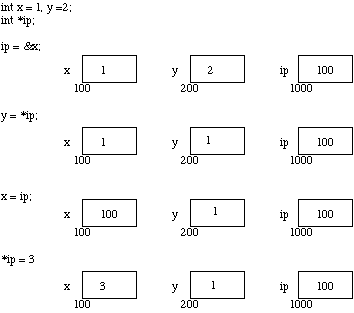
It is worth considering what is going on at the machine level in memory to fully understand how pointer work. . Assume for the sake of this discussion that variable x resides at memory location 100, y at 200 and ip at 1000. Note A pointer is a variable and thus its values need to be stored somewhere. It is the nature of the pointers value that is new.
Variables and Memory Now the assignments x = 1 and y = 2 obviously load these values into the variables. ip is declared to be a pointer to an integer and is assigned to the address of x (&x). So ip gets loaded with the value 100.
Next y gets assigned to the contents of ip. In this example ip currently points to memory location 100 -- the location of x. So y gets assigned to the values of x -- which is 1.
We have already seen that C is not too fussy about assigning values of different type. Thus it is perfectly legal (although not all that common) to assign the current value of ip to x. The value of ip at this instant is 100.
Finally we can assign a value to the contents of a pointer (*ip).
IMPORTANT: When a pointer is declared it does not point anywhere. You must set it to point somewhere before you use it.
So ...
int *ip;
*ip = 100;
will generate an error (program crash!!).
The correct use is:
int *ip;
int x;
ip = &x;
*ip = 100;
We can do integer arithmetic on a pointer:
float *flp, *flq;
*flp = *flp + 10;
++*flp;
(*flp)++;
flq = flp;
NOTE: A pointer to any variable type is an address in memory -- which is an integer address. A pointer is definitely NOT an integer.
The reason we associate a pointer to a data type is so that it knows how many bytes the data is stored in. When we increment a pointer we increase the pointer by one ``block'' memory.
So for a character pointer ++ch_ptr adds 1 byte to the address.
For an integer or float ++ip or ++flp adds 4 bytes to the address.
Consider a float variable (fl) and a pointer to a float (flp) as shown blow
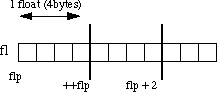
poinetr Arithmetic Assume that flp points to fl then if we increment the pointer ( ++flp) it moves to the position shown 4 bytes on. If on the other hand we added 2 to the pointer then it moves 2 float positions i.e 8 bytes as shown in the Figure.
WHAT IS MEAN BY "APPLET"?
An applet is a program written in the Java programming language that can be included in an HTML page, much in the same way an image is included in a page. When you use a Java technology-enabled browser to view a page that contains an applet, the applet's code is transferred to your system and executed by the browser's Java Virtual Machine (JVM). For information and examples on how to include an applet in an HTML page.
Thursday, April 22, 2010
HOW 2 WORK A "C" PROGRAM?
C is a computer programming language. That means that you can use C to create lists of instructions for a computer to follow. C is one of thousands of programming languages currently in use. C has been around for several decades and has won widespread acceptance because it gives programmers maximum control and efficiency. C is an easy language to learn. It is a bit more cryptic in its style than some other languages, but you get beyond that fairly quickly.
C is what is called a compiled language. This means that once you write your C program, you must run it through a C compiler to turn your program into an executable that the computer can run (execute). The C program is the human-readable form, while the executable that comes out of the compiler is the machine-readable and executable form. What this means is that to write and run a C program, you must have access to a C compiler. If you are using a UNIX machine (for example, if you are writing CGI scripts in C on your host's UNIX computer, or if you are a student working on a lab's UNIX machine), the C compiler is available for free. It is called either "cc" or "gcc" and is available on the command line. If you are a student, then the school will likely provide you with a compiler -- find out what the school is using and learn about it. If you are working at home on a Windows machine, you are going to need to download a free C compiler or purchase a commercial compiler. A widely used commercial compiler is Microsoft's Visual C++ environment (it compiles both C and C++ programs). Unfortunately, this program costs several hundred dollars. If you do not have hundreds of dollars to spend on a commercial compiler, then you can use one of the free compilers available on the Web.
 We will start at the beginning with an extremely simple C program and build up from there. I will assume that you are using the UNIX command line and gcc as your environment for these examples; if you are not, all of the code will still work fine -- you will simply need to understand and use whatever compiler you have available.
C is what is called a compiled language. This means that once you write your C program, you must run it through a C compiler to turn your program into an executable that the computer can run (execute). The C program is the human-readable form, while the executable that comes out of the compiler is the machine-readable and executable form. What this means is that to write and run a C program, you must have access to a C compiler. If you are using a UNIX machine (for example, if you are writing CGI scripts in C on your host's UNIX computer, or if you are a student working on a lab's UNIX machine), the C compiler is available for free. It is called either "cc" or "gcc" and is available on the command line. If you are a student, then the school will likely provide you with a compiler -- find out what the school is using and learn about it. If you are working at home on a Windows machine, you are going to need to download a free C compiler or purchase a commercial compiler. A widely used commercial compiler is Microsoft's Visual C++ environment (it compiles both C and C++ programs). Unfortunately, this program costs several hundred dollars. If you do not have hundreds of dollars to spend on a commercial compiler, then you can use one of the free compilers available on the Web.

WHAT IS MEAN BY "INTERNET"?
The Internet, sometimes called simply "the Net," is a worldwide system of computer networks - a network of networks in which users at any one computer can, if they have permission, get information from any other computer (and sometimes talk directly to users at other computers). It was conceived by the Advanced Research Projects Agency (ARPA) of the U.S. government in 1969 and was first known as the ARPANET. The original aim was to create a network that would allow users of a research computer at one university to be able to "talk to" research computers at other universities. A side benefit of ARPANet's design was that, because messages could be routed or rerouted in more than one direction, the network could continue to function even if parts of it were destroyed in the event of a military attack or other disaster.
Today, the Internet is a public, cooperative, and self-sustaining facility accessible to hundreds of millions of people worldwide. Physically, the Internet uses a portion of the total resources of the currently existing public telecommunication networks. Technically, what distinguishes the Internet is its use of a set of protocols called TCP/IP (for Transmission Control Protocol/Internet Protocol). Two recent adaptations of Internet technology, the intranet and the extranet, also make use of the TCP/IP protocol.
For many Internet users, electronic mail (e-mail) has practically replaced the Postal Service for short written transactions. Electronic mail is the most widely used application on the Net. You can also carry on live "conversations" with other computer users, using Internet Relay Chat (IRC). More recently, Internet telephony hardware and software allows real-time voice conversations.
The most widely used part of the Internet is the World Wide Web (often abbreviated "WWW" or called "the Web"). Its outstanding feature is hypertext, a method of instant cross-referencing. In most Web sites, certain words or phrases appear in text of a different color than the rest; often this text is also underlined. When you select one of these words or phrases, you will be transferred to the site or page that is relevant to this word or phrase. Sometimes there are buttons, images, or portions of images that are "clickable." If you move the pointer over a spot on a Web site and the pointer changes into a hand, this indicates that you can click and be transferred to another site.
Using the Web, you have access to millions of pages of information. Web browsing is done with a Web browser, the most popular of which are Microsoft Internet Explorer and Netscape Navigator. The appearance of a particular Web site may vary slightly depending on the browser you use. Also, later versions of a particular browser are able to render more "bells and whistles" such as animation, virtual reality, sound, and music files, than earlier versions.
WAT IS MEAN BY C++?
C++ is a type of computer programming language. Created in 1983 by Bjarne Stroustrup, C++ was designed to serve as an enhanced version of the C programming language. C++ is object oriented and is considered a high level language. However, it features low level facilities. C++ is one of the most commonly used programming language.
The development of C++ actually began four years before its release, in 1979. It did not start out with the name C++; its first name was C with Classes. In the late part of 1983, C with Classes was first used for AT&T’s internal programming needs. Its name was changed to C++ later in the same year. C++ was not released commercially until the late part of 1985.
Developed at Bell Labs, C++ enhanced the C programming language in a variety of ways. Among the features of C++ are classes, virtual functions, templates, and operator overloading. The C++ language also counts multiple inheritance and exception handling among its many features. C++ introduced the use of declarations as statements and includes more type checking than is available with the C programming language.
Considered a superset of the C programming language, C++ maintains a variety of features that are included within its predecessor. As such, C programs are generally able to run successfully in C++ compilers. However, there are some issues that may cause C code to perform differently in C++ compilers. In fact, it is possible for some C code to be incompatible in C++.
The C++ computer programming language was created for UNIX, providing programmers with the advantage of being able to modify code without actually changing it; C++ code is reusable. Also, library creation is cleaner in C++. The C++ programming language is considered portable and does not require the use of a specific piece of hardware or just one operating system.
Another important feature of C++ is the use of classes. Classes help programmers with the organization of their code. They can also be beneficial in helping programmers to avoid mistakes. However, there are times when mistakes do slip through. When this happens, classes can be instrumental in finding bugs and correcting them.
The original C++ compiler, called Cfront, was written in the C++ programming language. C++ compilation is considered efficient and fast. Its speed can be attributed to its high-level features in conjunction with its low-level components. When compared to other computer programming languages, C++ can be viewed as quite short. This is due to the fact that C++ leans towards the use of special characters instead of keywords.
The development of C++ actually began four years before its release, in 1979. It did not start out with the name C++; its first name was C with Classes. In the late part of 1983, C with Classes was first used for AT&T’s internal programming needs. Its name was changed to C++ later in the same year. C++ was not released commercially until the late part of 1985.
Developed at Bell Labs, C++ enhanced the C programming language in a variety of ways. Among the features of C++ are classes, virtual functions, templates, and operator overloading. The C++ language also counts multiple inheritance and exception handling among its many features. C++ introduced the use of declarations as statements and includes more type checking than is available with the C programming language.
Considered a superset of the C programming language, C++ maintains a variety of features that are included within its predecessor. As such, C programs are generally able to run successfully in C++ compilers. However, there are some issues that may cause C code to perform differently in C++ compilers. In fact, it is possible for some C code to be incompatible in C++.
The C++ computer programming language was created for UNIX, providing programmers with the advantage of being able to modify code without actually changing it; C++ code is reusable. Also, library creation is cleaner in C++. The C++ programming language is considered portable and does not require the use of a specific piece of hardware or just one operating system.
Another important feature of C++ is the use of classes. Classes help programmers with the organization of their code. They can also be beneficial in helping programmers to avoid mistakes. However, there are times when mistakes do slip through. When this happens, classes can be instrumental in finding bugs and correcting them.
The original C++ compiler, called Cfront, was written in the C++ programming language. C++ compilation is considered efficient and fast. Its speed can be attributed to its high-level features in conjunction with its low-level components. When compared to other computer programming languages, C++ can be viewed as quite short. This is due to the fact that C++ leans towards the use of special characters instead of keywords.
CREATOR OF JAVA
In the early nineties, Java was created by a team led by James Gosling for Sun Microsystems. It was originally designed for use on digital mobile devices, such as cell phones. However, when Java 1.0 was released to the public in 1996, its main focus had shifted to use on the Internet. It provided more interactivity with users by giving developers a way to produce animated webpages . Over the years it has evolved as a successful language for use both on and off the Internet. A decade later, it’s still an extremely popular language with over 6.5million developers worldwide.
JAVA MEANS?

Tuesday, April 20, 2010
DEFINTION OF REDTOOTH
redtooth is the latest technology which is been invented by hp by mani sharma and chiruta aka tarun. it gives
range up to 5000mtr .
it is the genN wireless device which can take over any wireless device
it can also replace wi-fi
range up to 5000mtr .
it is the genN wireless device which can take over any wireless device
it can also replace wi-fi
DEFINTION OF BLUTOOTH
Definition: Bluetooth technology is a wireless protocol that connects electronic devices while they are close to each another.

Sunday, April 18, 2010


Subscribe to:
Comments (Atom)
referal link
